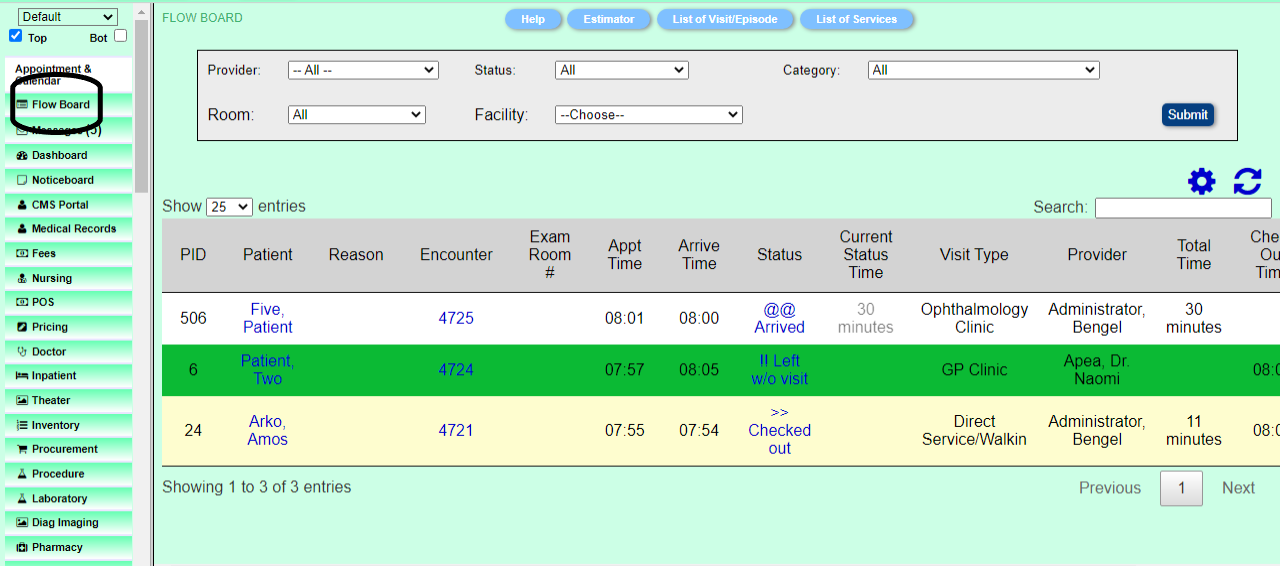
Flowboard
• The term Flow Board in Bengel BH is interface that displays the flow of patient and provides working sheet that allows users interact with display or enter data/information.
• TITLE: On the left top coner of a worksheet is a Title that describes the functions, features and information about the worksheet.
• RELATED INFORMATION LINKS: On the left center are links that open other pages/reports for accessing related information.
• DATA FILTERS: Data filter is used to screen and/or exclude/include data/information. Data filtering is the process of choosing a smaller part of your data set and using that subset for viewing or analysis. Example of filter is from and to date range
SHEETS: A worksheet may contain one sheet or multiple sheets. Each sheet has a tab with a title and can may be access by clicking on the tab
• NUMBER OF ROWS DISPLAYED: There is drop down to specified the number rows to diaplay. By default the number is 25.
• SEARCH BOX/FIELD: Worksheet has search box/field to retrieve related information from the database
• COLUMN, ROW & CELL. The worksheet consists of cells organized into columns and rows. Eack column are groups of cells that are on the same vertical line.Eack columns has a title describing the related function(s) performed by the cells. Eack row are groups of cells that are on the same horizontal line. Each row belongs to a patient/client or an item. Eack cell contains either information or a link to an interface/page that displays information or page for data entry. When clicked on the link it opens the interface/page in a popup or tab or another window.

• Patient Flow Board shows the patient status with colors based on the appointment status code. The 'Current Status Time' is reset and restarted with each status change, but the total time keeps running (times are based upon arrival time not appointment time). These time and status changes are stored so they can be retrieved on the Patient Flow Board report.
• Login to HealthAdm
• Select Flowboard
Additional Info
None.
None
Images
Patient Registration Page